Remove Image Backgrounds with Rembg CLI
How to easily remove image backgrounds locally with Rembg


A part of my job involves creating slides for presentations (for clients, events, etc.), which led me down this path: finding a great tool for background removal from an image.
So, why does this even matter?
Well, your mileage may vary, but the way I approach these presentations is through a ton of visuals. I believe it helps capture the audience’s attention better. While doing this, I constantly come across images that I wish were available as an alternate version, with a transparent background.
Let me explain with an example. Imagine presenting to a few executives at a customer’s office, and you get to slide 10. It has three beautiful images that are each telling a collective story, BUT they all have different background colors. One might be black, one red, and the other yellow. This can be jarring to the eye and put people off, especially those with an attention to detail. If you have a color theme running throughout your presentation deck (let’s say a white background on all slides, blue fonts, and black borders), you ideally want your pictures to have the same background effect to harmonize with the main deck.
Hopefully, that explains why this tool became a lifeline for my day job. Let’s get into the tool itself now.
I scanned the internet and found a few different ways to do this, but the most reliable way to remove backgrounds without paying a single penny was this GOAT of a tool that I found: Rembg. It has a simple CLI that I use to get the job done. I’ll show you how below.
Introduction: Rembg
Rembg is a tool to remove image backgrounds. It can be used as a CLI, Python library, HTTP server, or Docker container.
Installation
I use macOS. If you are on a Mac as well, the commands below will help you set it up:
pip3 install "rembg[cpu,cli]"
After the installation please run the below commands to confirm its installed successfully along with instructions:
rembg --version
# rembg, version 2.0.84

rembg --help
# Usage: rembg [OPTIONS] COMMAND [ARGS]...

# Options:
#   --version  Show the version and exit.
#   --help     Show this message and exit.

# Commands:
#   b  for a byte stream as input
#   d  download models
#   i  for a file as input
#   m  migrate models from the legacy ~/.u2net directory
#   p  for a folder as input
#   s  for a http server
As you can see from the instructions above, there are multiple commands to get the job done. I use i because it handles single file input/output, but you could choose p for batch processing. For example, if you run a large e-commerce website, you could upload entire folders of images through this workflow to harmonize their backgrounds before publishing them to your site.
I started with just one image, but realized it forced Rembg to download a model before running the task. Once I completed that task, I decided to run d to download all the models for future use.
rembg i /Users/mbilal/Desktop/b300.jpg /Users/mbilal/Desktop/b300.png
Downloading data from 'https://github.com/danielgatis/rembg/releases/download/v0.0.0/bria-rmbg-2.0.onnx' to file '/Users/mbilal/.rembg/models/bria-rmbg/bria-rmbg.onnx'.
100%|██████████████████████████████████████| 1.02G/1.02G [00:00<00:00, 161GB/s]


rembg d
No models specified, downloading all models
Downloading model: birefnet-general
Downloading data from 'https://github.com/danielgatis/rembg/releases/download/v0.0.0/BiRefNet-general-epoch_244.onnx' to file '/Users/mbilal/.rembg/models/birefnet-general/birefnet-general.onnx'.
100%|████████████████████████████████████████| 973M/973M [00:00<00:00, 318GB/s]
Downloading model: birefnet-general-lite
Downloading data from 'https://github.com/danielgatis/rembg/releases/download/v0.0.0/BiRefNet-general-bb_swin_v1_tiny-epoch_232.onnx' to file '/Users/mbilal/.rembg/models/birefnet-general-lite/birefnet-general-lite.onnx'.
100%|████████████████████████████████████████| 224M/224M [00:00<00:00, 788GB/s]
Downloading model: birefnet-portrait
Downloading data from 'https://github.com/danielgatis/rembg/releases/download/v0.0.0/BiRefNet-portrait-epoch_150.onnx' to file '/Users/mbilal/.rembg/models/birefnet-portrait/birefnet-portrait.onnx'.
100%|███████████████████████████████████████| 973M/973M [00:00<00:00, 2.67TB/s]
Downloading model: birefnet-dis
Downloading data from 'https://github.com/danielgatis/rembg/releases/download/v0.0.0/BiRefNet-DIS-epoch_590.onnx' to file '/Users/mbilal/.rembg/models/birefnet-dis/birefnet-dis.onnx'.
100%|███████████████████████████████████████| 973M/973M [00:00<00:00, 1.24TB/s]
Downloading model: birefnet-hrsod
Downloading data from 'https://github.com/danielgatis/rembg/releases/download/v0.0.0/BiRefNet-HRSOD_DHU-epoch_115.onnx' to file '/Users/mbilal/.rembg/models/birefnet-hrsod/birefnet-hrsod.onnx'.
100%|███████████████████████████████████████| 973M/973M [00:00<00:00, 2.27TB/s]
Downloading model: birefnet-cod
Downloading data from 'https://github.com/danielgatis/rembg/releases/download/v0.0.0/BiRefNet-COD-epoch_125.onnx' to file '/Users/mbilal/.rembg/models/birefnet-cod/birefnet-cod.onnx'.
100%|███████████████████████████████████████| 973M/973M [00:00<00:00, 2.65TB/s]
Downloading model: birefnet-massive
Downloading data from 'https://github.com/danielgatis/rembg/releases/download/v0.0.0/BiRefNet-massive-TR_DIS5K_TR_TEs-epoch_420.onnx' to file '/Users/mbilal/.rembg/models/birefnet-massive/birefnet-massive.onnx'.
100%|████████████████████████████████████████| 973M/973M [00:00<00:00, 312GB/s]
Downloading model: isnet-anime
Downloading data from 'https://github.com/danielgatis/rembg/releases/download/v0.0.0/isnet-anime.onnx' to file '/Users/mbilal/.rembg/models/isnet-anime/isnet-anime.onnx'.
100%|████████████████████████████████████████| 176M/176M [00:00<00:00, 122GB/s]
Downloading model: dis_custom
Error downloading model: model_path is required
Downloading model: isnet-general-use
Downloading data from 'https://github.com/danielgatis/rembg/releases/download/v0.0.0/isnet-general-use.onnx' to file '/Users/mbilal/.rembg/models/isnet-general-use/isnet-general-use.onnx'.
100%|████████████████████████████████████████| 179M/179M [00:00<00:00, 478GB/s]
Downloading model: sam
Downloading data from 'https://github.com/danielgatis/rembg/releases/download/v0.0.0/sam_vit_b_01ec64.encoder.onnx' to file '/Users/mbilal/.rembg/models/sam/sam_vit_b_01ec64.encoder.onnx'.
100%|███████████████████████████████████████| 359M/359M [00:00<00:00, 1.37TB/s]
Downloading data from 'https://github.com/danielgatis/rembg/releases/download/v0.0.0/sam_vit_b_01ec64.decoder.onnx' to file '/Users/mbilal/.rembg/models/sam/sam_vit_b_01ec64.decoder.onnx'.
100%|██████████████████████████████████████| 16.5M/16.5M [00:00<00:00, 164GB/s]
Downloading model: silueta
Downloading data from 'https://github.com/danielgatis/rembg/releases/download/v0.0.0/silueta.onnx' to file '/Users/mbilal/.rembg/models/silueta/silueta.onnx'.
100%|██████████████████████████████████████| 44.2M/44.2M [00:00<00:00, 190GB/s]
Downloading model: u2net_cloth_seg
Downloading data from 'https://github.com/danielgatis/rembg/releases/download/v0.0.0/u2net_cloth_seg.onnx' to file '/Users/mbilal/.rembg/models/u2net_cloth_seg/u2net_cloth_seg.onnx'.
100%|███████████████████████████████████████| 176M/176M [00:00<00:00, 1.06TB/s]
Downloading model: u2net_custom
Error downloading model: model_path is required
Downloading model: u2net_human_seg
Downloading data from 'https://github.com/danielgatis/rembg/releases/download/v0.0.0/u2net_human_seg.onnx' to file '/Users/mbilal/.rembg/models/u2net_human_seg/u2net_human_seg.onnx'.
100%|████████████████████████████████████████| 176M/176M [00:00<00:00, 402GB/s]
Downloading model: u2net
Downloading data from 'https://github.com/danielgatis/rembg/releases/download/v0.0.0/u2net.onnx' to file '/Users/mbilal/.rembg/models/u2net/u2net.onnx'.
100%|████████████████████████████████████████| 176M/176M [00:00<00:00, 457GB/s]
Downloading model: u2netp
Downloading data from 'https://github.com/danielgatis/rembg/releases/download/v0.0.0/u2netp.onnx' to file '/Users/mbilal/.rembg/models/u2netp/u2netp.onnx'.
100%|█████████████████████████████████████| 4.57M/4.57M [00:00<00:00, 36.9GB/s]
Downloading model: bria-rmbg
Downloading model: ben_custom
Error downloading model: model_path is required
The custom failures are normal. Because we did not specify a path for custom models Rembg skipped them. The standard models did download successfully.
I checked the official GitHub documentation, and it turns out this is by design, those ONNX models are set to download automatically the first time you fire up the tool.
Local ONNX models are automatically downloaded on first use and saved under ~/.rembg/models/ (see Where models are stored). The withoutbg model is a cloud API backend and does not download a local model.
Model list:
- u2net (download, source): A pre-trained model for general use cases.
- u2netp (download, source): A lightweight version of u2net model.
- u2net_human_seg (download, source): A pre-trained model for human segmentation.
- u2net_cloth_seg (download, source): A pre-trained model for Cloths Parsing from human portrait. Here clothes are parsed into 3 category: Upper body, Lower body and Full body.
- silueta (download, source): Same as u2net but the size is reduced to 43Mb.
- isnet-general-use (download, source): A new pre-trained model for general use cases.
- isnet-anime (download, source): A high-accuracy segmentation for anime character.
- sam (download encoder, download decoder, source): A pre-trained model for any use cases.
- birefnet-general (download, source): A pre-trained model for general use cases.
- birefnet-general-lite (download, source): A light pre-trained model for general use cases.
- birefnet-portrait (download, source): A pre-trained model for human portraits.
- birefnet-dis (download, source): A pre-trained model for dichotomous image segmentation (DIS).
- birefnet-hrsod (download, source): A pre-trained model for high-resolution salient object detection (HRSOD).
- birefnet-cod (download, source): A pre-trained model for concealed object detection (COD).
- birefnet-massive (download, source): A pre-trained model with massive dataset.
- bria-rmbg (download, source): The default. A state-of-the-art background removal model by BRIA AI. At ~1.02 GB it is the largest local model here and runs at 1024x1024, so it is slower than u2net; pass -m u2net for a smaller, faster model with blockier edges. Note that RMBG-2.0 is released under a BRIA license that requires a paid agreement for commercial use. Model weights carry their own licenses, independent of rembg’s MIT license — check the linked source before using any model commercially.
- withoutbg (API, sample results): Cloud API backend. Get 50 free credits with signup. Pass api_key via -x / new_session(…), or set WITHOUTBG_API_KEY. Images are sent to withoutBG’s servers; max upload size is 20 MB.
The default model, bria-rmbg, is outstanding. It is a state-of-the-art model. At ~1GB, it is also the largest model on the list. It’s considered a bit slower than some of the smaller models, but the latency and size penalty is totally worth it when you consider the amazing outputs it churns out. It is built on the BiRefNet architecture and contains 0.2B parameters, which is relatively lightweight compared to massive LLMs. It is available for non-commercial use via the link above; for commercial purposes, be sure to read the official docs and follow their instructions.
Background Removal
Let’s run a few images through the Rembg CLI to analyze the outputs. For this demo, we’ll stick to the Bria model, as I find it to be the most effective of the ones I’ve tested.
Image 1: Leo (perhaps the Greatest of All Time).

rembg i messi.webp messi-rembg.png

That is ABSOLUTELY AMAZING. The way it cuts out the edges never fails to impress me.
Image 2: A nostalgic still from The Phantom (1996)
Pic Source: Reddit

rembg i phantom.jpeg phantom-rembg.png
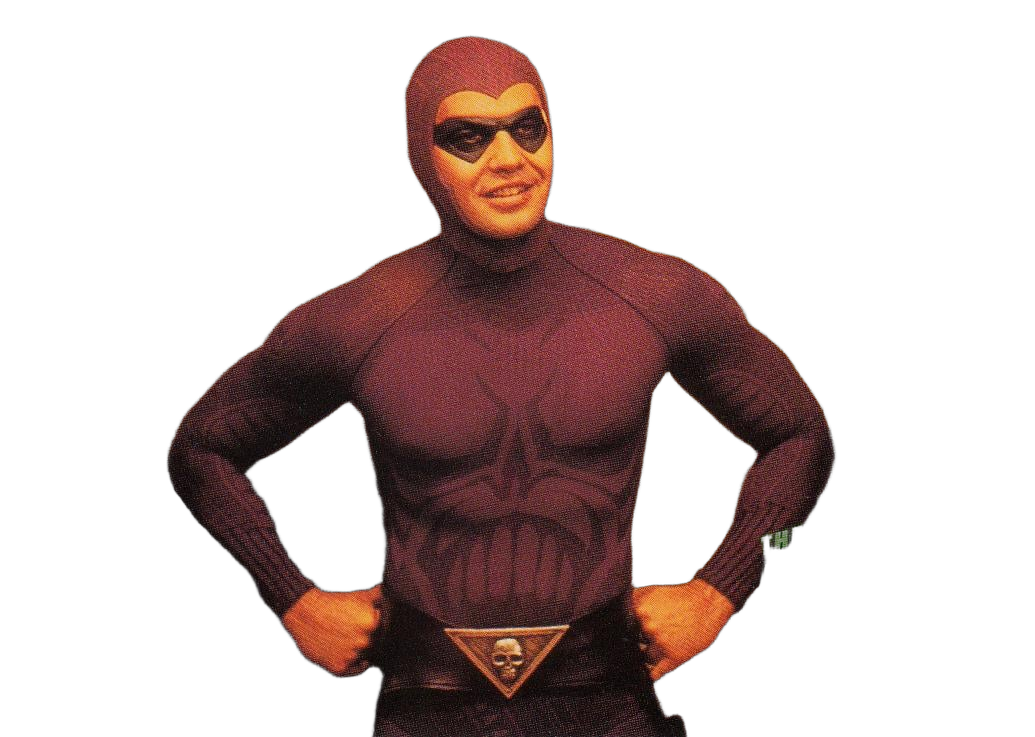
Besides the almost unavoidable text wrapped over the left arm, the result is quite amazing again.
Image 2: An iconic frame from Terminator 2
Pic Source: IMDB

rembg i t2.jpg t2-rembg.png

ABSOLUTELY STUNNING result, to say the least.
This brings us to the end of what has been a really exciting post for me to write. I hope you enjoyed it too, and I hope this proves useful to some of you reading. Thanks for your time!