BMP vs PNG
Are BMP images still relevant? How do they compare with PNG?

If you have not heard of BMP image file format it’s not surprising. It is no longer a popular image format. PNG has for long dominated this space and continues to do so at the time of writing this blog, with the advent of formats like WebP and AVIF though, PNG has been slowly losing some ground.
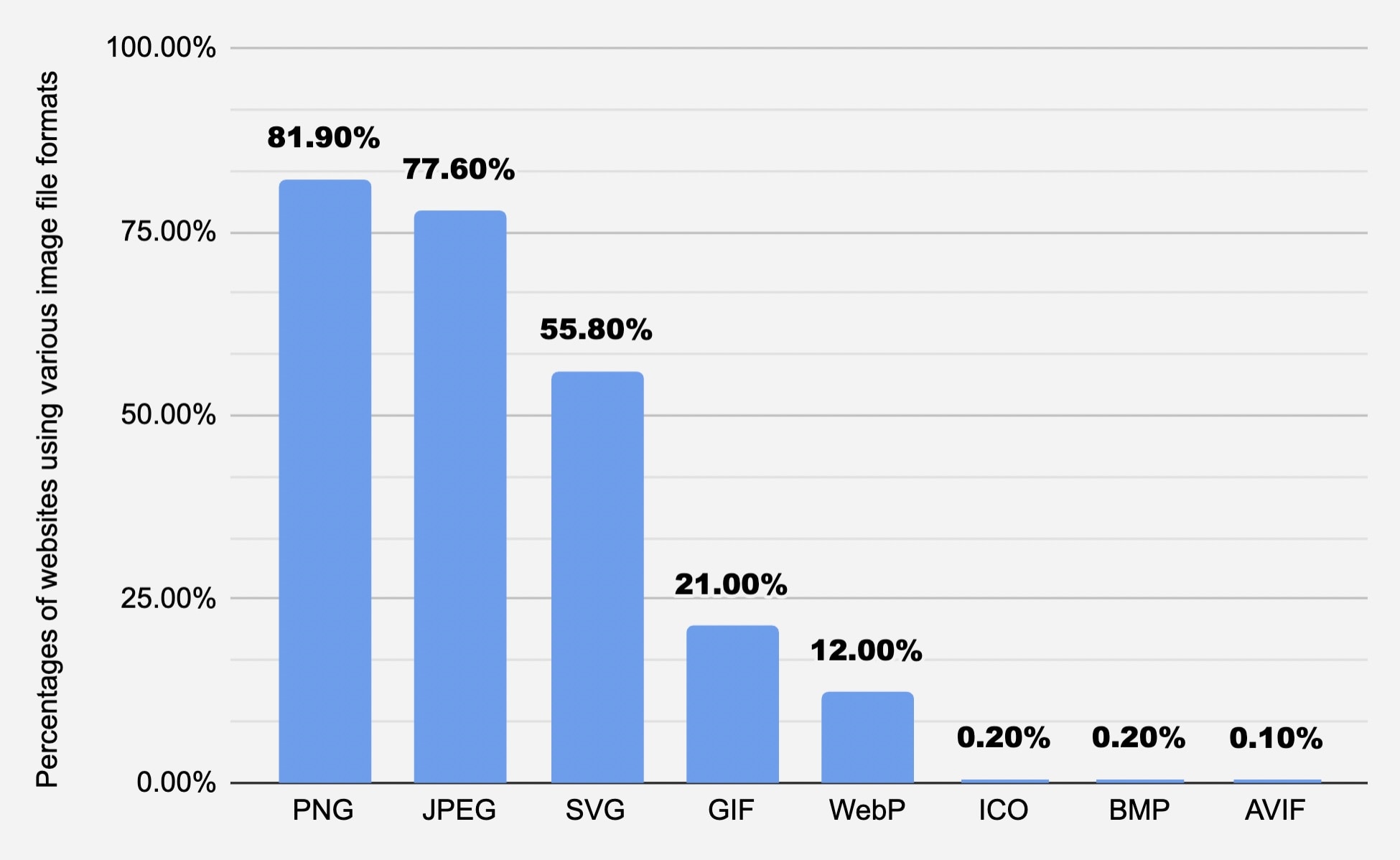
Source : W3Techs
The chart/diagram above shows the percentage of websites using various image formats. This data comes from w3techs.com, their data is updated daily.
So what is BMP?
BMP or Bitmap is a raster/pixel based image format developed by Microsoft. It was released in 1985(Initial Release), originally for the Microsoft and OS/2 operating systems. While initially developed for Microsoft OS it enjoys widespread support today which includes MacOS, Android and iOS.
Apple documentation for BMP support - https://developer.apple.com/documentation/uniformtypeidentifiers/uttype/3551468-bmp
Google documentation for BMP support in Android - https://developer.android.com/media/platform/supported-formats#image-formats
BMP can store images in both monochrome and color. Support for color depth goes all the way upto 64 bits/pixel (1, 2, 4, 8, 16, 24, 32, 64). While there is some lossless compression that is allowed in its specification, BMP for all practical purposes is an uncompressed image format, especially when color depth is 16 bits/pixel or 32 bits/pixel. There is a misconception on the internet that BMP does not support alpha channel/transparency, this is not true. BMP supports an optional alpha channel for transparency. Most applications though recommend you move to PNG if you have alpha channel/transparency needs.
While most if not all of you are aware of the PNG file format, let us talk about it briefly for the purpose of this comparison.
PNG(Portable Network Graphics) is a raster/pixel based image format that supports lossless compression and alpha channel/transparency. PNG uses DEFLATE lossless data compression algorithm. Initially developed as an improvement over the existing GIF format it enjoys widespread support on all types of devices, is the dominant image file format on web today. PNG was released in 1996, almost three decades ago.
PNG is an open format, you do not need a license to use this format in your systems.
Since PNG is a lossless image format it preserves all information, can we achieve any kind of compression for these images?
I have written about it in this blog - Can we compress PNG files
Leaving below a PNG to BMP conversion (using ImageMagick) example:
Here I take the logo of my website which is a PNG-24 image (up to 16 million colors) as input/source image, converted it to BMP format, the resultant image is approximately 173x larger in bytes than the original PNG image.
Source PNG-24 (52 KB):

BMP output (9 MB):

Commands used to convert a PNG-24 image to BMP using ImageMagick:
file crlogodark.png
#Response
crlogodark.png: PNG image data, 1500 x 1500, 8-bit/color RGBA, non-interlaced

magick crlogodark.png crlogodark.bmp
file crlogodark.bmp
#Response
crlogodark.bmp: PC bitmap, Windows 98/2000 and newer format, 1500 x 1500 × 32, cbSize 9000138, bits offset 138