High-impact LCP optimization
The easy path to a great LCP

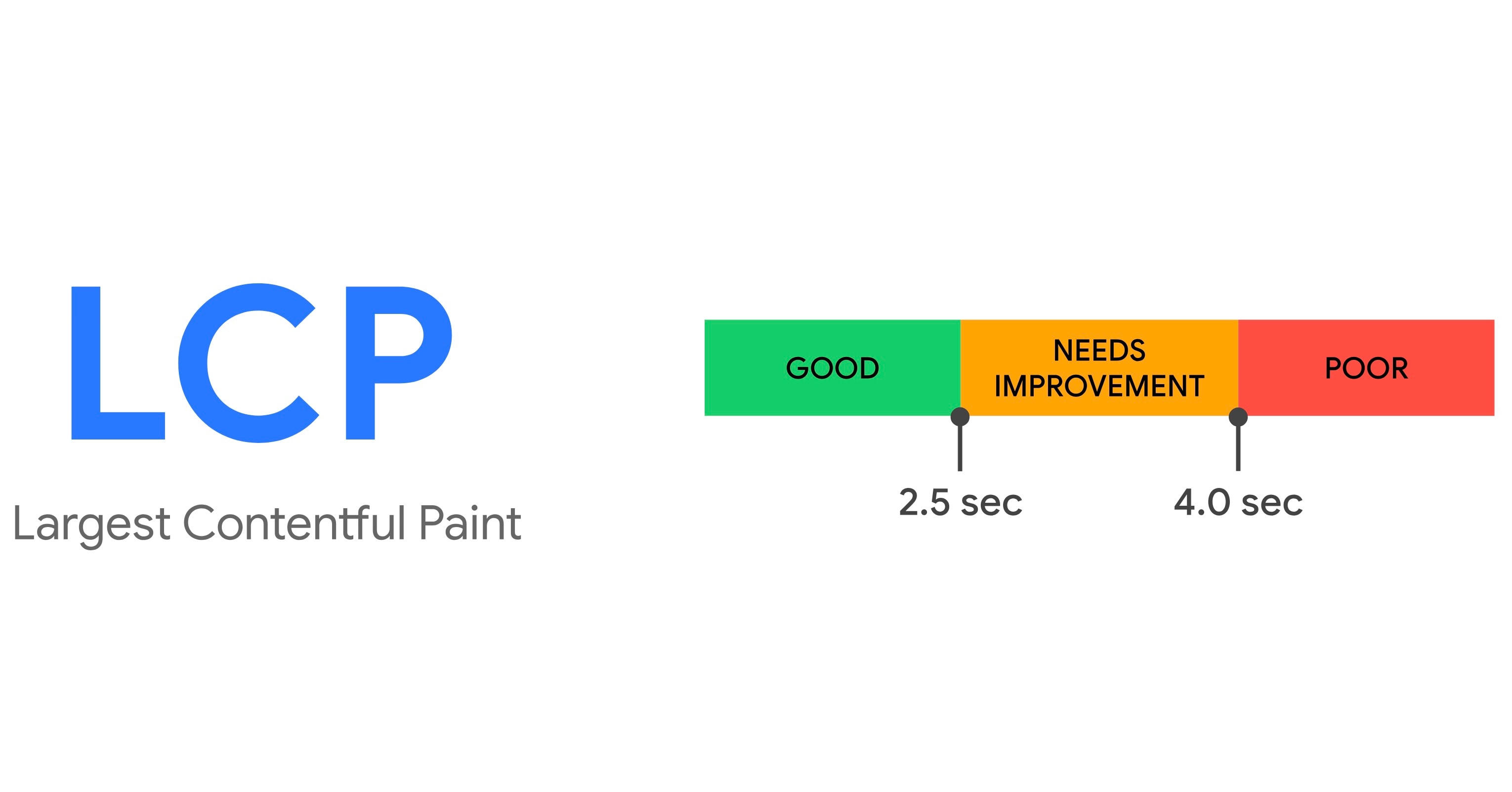
LCP is one of the core web vitals, occupies an extremely critical/prominent position in the field of Technical SEO. Google has a complete guide on optimizing LCP (leaving the link below for reference). While it is ideal for SEO experts to follow these guidelines the one easy path to a great LCP is ensuring modern/next-gen formats while serving images.
Source - https://web.dev/articles/optimize-lcp
Now let’s try and understand why modern image formats are important.
Before we go any further we first need to understand what constitutes an LCP. LCP as the name suggests, Largest Contentful Paint, is the largest block of text or an image or the first frame/poster of a video. All this metric does is it reports the render time of the largest text block/image/video in the viewport. The target is to keep it at 2.5 sec or below for a good score. Majority of the webpages will very likely have an image representing their largest element in the viewport. This makes image optimization extremely critical for a good LCP score, while there are other factors too, for now let’s focus on image optimization.
So what’s the recommendation?
I recommend converting existing image libraries from traditional JPEGs and PNGs to WebP. Serving WebP as the default format allows us to benefit from improved compression efficiency while satisfying Google’s recommendation to use modern, optimal formats like WebP or AVIF.
WebP is highly versatile because it offers superior compression while supporting both alpha channel transparency and animation. For more technical details, feel free to check out this 2024 blog post on using ImageMagick for the conversion: http://www.coderevere.com/convert-jpeg-to-webp-using-imagemagick/
Would a blanket conversion of the entire image library to WebP not introduce certain risks?
Very unlikely. At the time of this blog (~Mid 2026) WebP enjoys wide support on all kinds of devices except a tiny minority legacy devices or the extremely low budget devices, which may have a small footprint in certain developing economies. It is for you to investigate/analyze your current traffic patterns to confirm if such devices have a role in your consumption trends.
Android has been supporting WebP from Version 4 (transparency from 4.3). Support for Animated WebP was added much later in Android 9. Android 4 was released in 2011 and 9 came out in 2018.
Note : Version 4/9 onwards is OOTTB support, does not require bundling in a native WebP decoder within your application.
Think about this: It has been over a decade since animated WebP support was introduced. If we look at the current Android demographics in 2026, the vast majority of active devices are running modern versions (Android 10 through 16) that fully support WebP’s entire feature set—including transparency and animation.
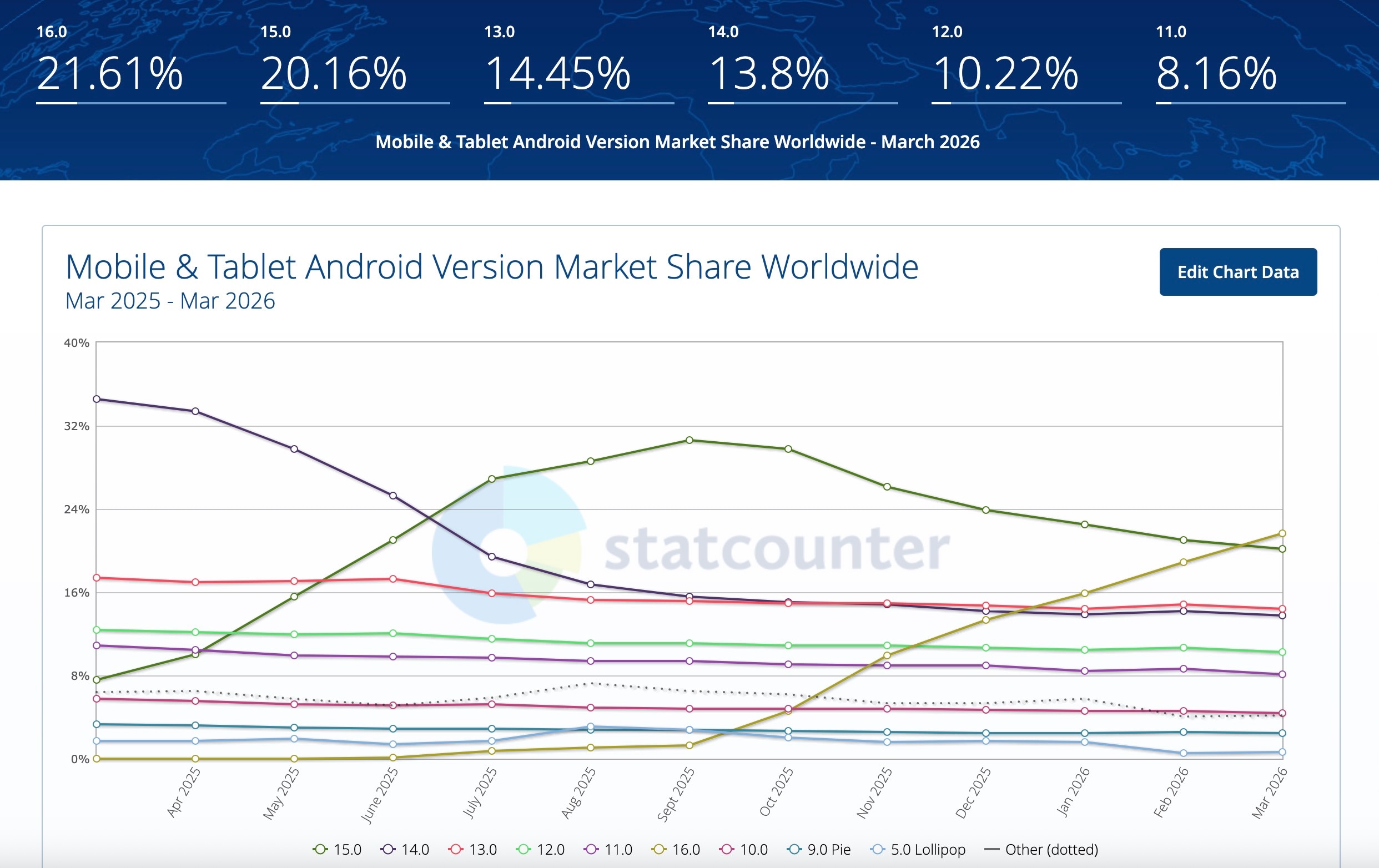
Source : Statscounter
As you can see from this image above, Android 5 or even 9 are a minority percentage of the ecosystem, 5 occupies less than 1%, 9 has a little over 2.5% right now. You could do GIF to WebP conversions in a future release but lossy and transparent WebP’s can be introduced right now as it is quite safe.
Now let’s see if its as safe on iOS as it is on Android -
WebP support (including transparency and animation) was added starting iOS 14.0+
iOS 14 was released in 2020. We are a little over half a decade past that now. This means much more in iOS device ecosystem as it’s not fragmented like Android hence the upgrades are more controlled with only 1 company releasing a few devices every year unlike Android which had 200+ brands as recently as 2023 with 100s of releases every year which makes it very difficult to phase out older versions of the operating system.
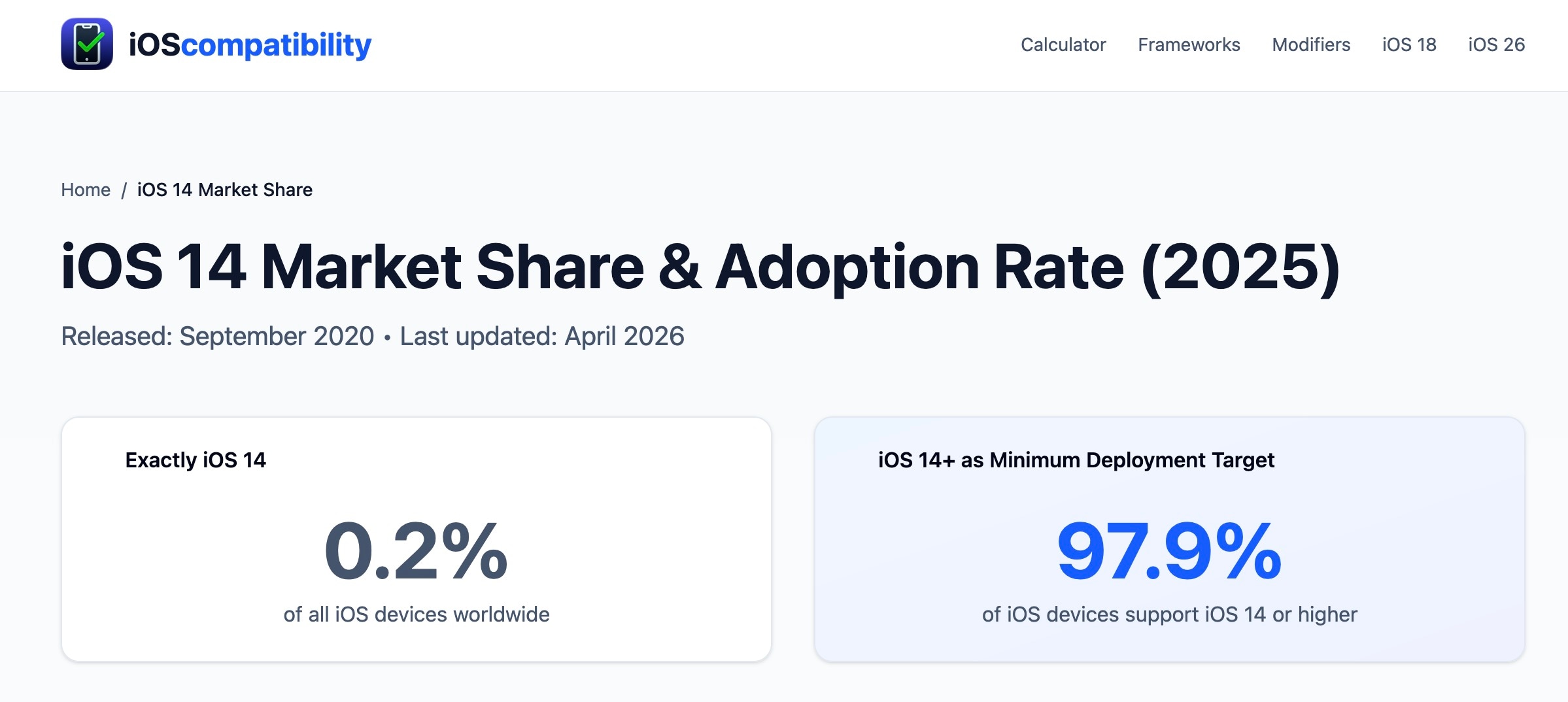
Let’s look at iOS demographics now. iOS 14 is down to 0.2 percent. Makes it very safe to convert to WebPs for iOS too.
You can check this page for detailed support documentation - https://developers.google.com/speed/webp/faq
Chrome has been supporting WebP for more than a decade now. Many websites, especially banking and other critical infrastructure, do not even support some of these older versions of Chrome or other browsers due to lack of support for modern encryption protocols. These versions are almost extinct now.
Why should any of this motivate me or my developers to convert to WebP?
Well this is the cheapest way to begin optimizing your LCP scores without buying expensive Image solutions in the market. All you need to do is install Image Magick and run the below command (sample, you can change flags/options basis your preferences) to introduce WebP and replace your existing library.
# For JPEGs -
magick example.jpg -quality 85 -define webp:lossless=false example.webp
# For PNGs -
magick example.png -quality 85 -define webp:lossless=false example.webp
I choose 85 for quality as it gives me the best of both worlds - fidelity and byte savings, you can choose the one that works best for you.
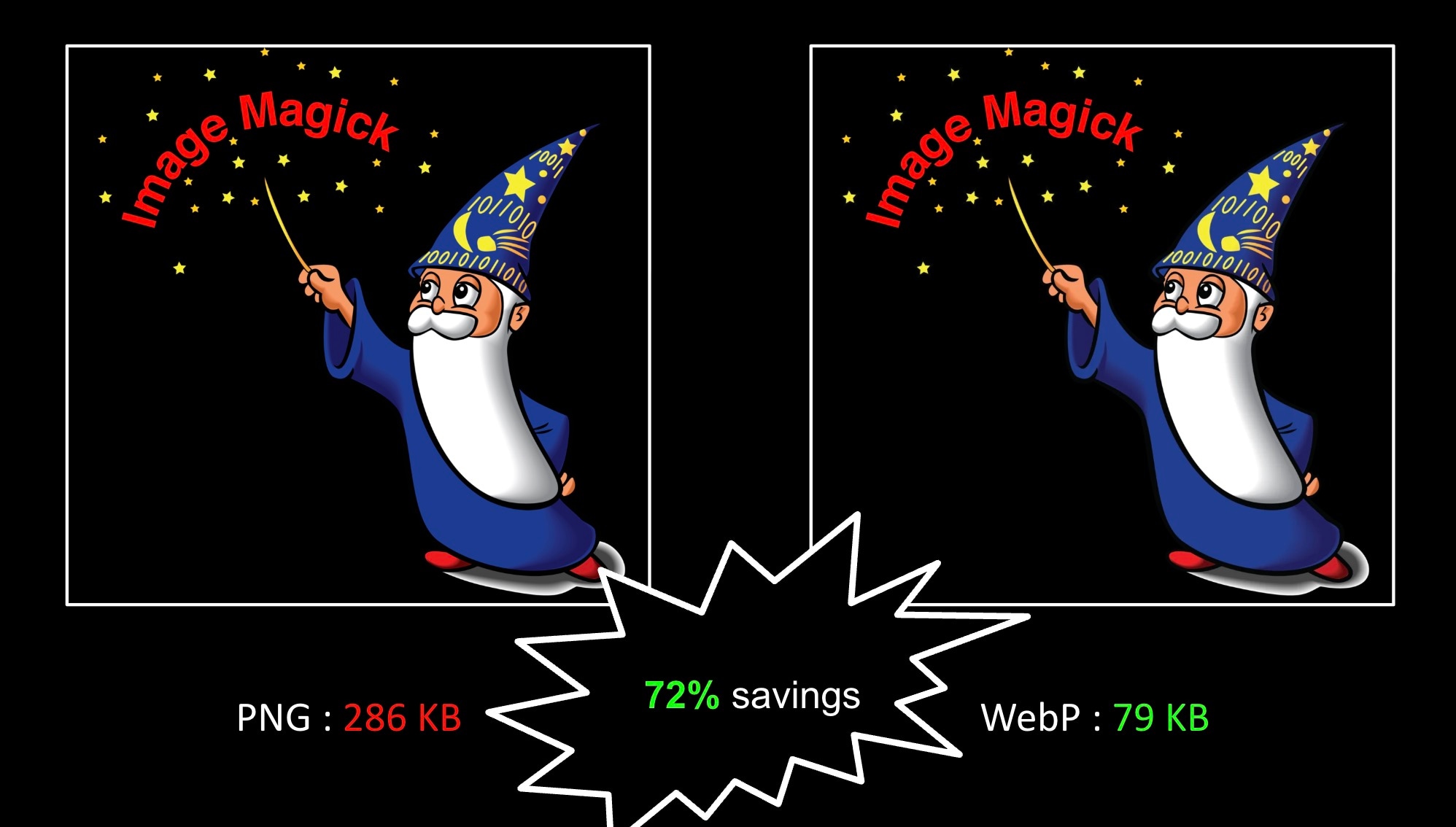
Sharing one such example below which shows massive savings when converted to WebP
Let’s Deep dive intro Trade offs / Risks
If you support a wide ecosystem of devices which includes budget devices in developing countries (these cant even support progressive JPEGs) or if you support legacy TV operating systems or if legacy versions of Android and Chrome still have a prominent presence in your traffic then you are better off writing rules in your CDN config to look at User-Agent / Accept header to route requests originating from supported devices to the WebP copies of your image library while serving JPEG/PNG to older/unsupported devices. I, for one, do not need to worry too much as my blog is web/browser only and is not driving business outcomes unlike other large websites that need to take a measured approach.
Is there a better approach than the above to my Image library?
Certainly! We have several market-leading image solutions that eliminate the need for the static approach we’ve been discussing. By using these, you can keep your high-quality JPEG and PNG originals in your library and let the service handle the heavy lifting—automatically serving the most optimal format at the best quality levels for each user.
This approach allows you to benefit from newer, cutting-edge formats like AVIF and the emerging JPEG XL, further increasing byte savings through a risk-free, managed SaaS model. Attempting a static implementation of AVIF today is quite risky; unlike WebP, it arrived much later and lacks the same universal support. You’re far better off with a managed solution that detects device compatibility and serves AVIF only where it’s supported, rather than trying to manage that complexity yourself.
Is it not possible for me to maintain traditional and WebP/AVIF/JXL versions of my image library on an S3 and write routing rules to serve the most optimal versions ?
It’s possible, will require maintaining multiple copies of each image, will only grow exponentially if you add multiple sizes to each image. While it’s doable, it would require significant effort in maintaining this library as well as tuning to the device ecosystem which keeps evolving as new software releases occur and older ones get phased out.
Managed Image Solution Recommendations (if you are in the market for one) -
There are plenty but I will list some of the major ones below (also amongst the best available today) -
- Cloudinary
- Akamai
- Cloudflare
- Gumlet
- Imagekit
- Nitrogen/N7
- Fastly
Please trial/POC the one that interests you to ensure it meets your requirements before selection.
This brings us to the end of this blog. Hope this was helpful. Thank you for your time.